


In this guide, we'll explore how you can pair Cognito with Authsignal's MFA capabilities using the AWS SDK, Authsignal Web SDK, and React. This combination gives you the complete freedom to build your own custom UI while maintaining all the security standards.
Repository Structure
You can access the complete source code with all implementation details on our GitHub repository and also experience it firsthand through our live demo.
The repo consists of two main components:
- Backend Lambda Functions — Handles the Cognito integration with Authsignal
Create-auth-challengelambda for initiating custom challenges via AuthsignalVerify-auth-challenge-responselambda for validating Authsignal challengesDefine-auth-challengeandPre-sign-uplambdas required for Cognito custom auth
- React Frontend — A complete implementation of the user-facing authentication experience
- Sign-up flow with Authsignal MFA
- Sign-in flow with Authsignal MFA
The code samples in this guide are extracted directly from this implementation.
Understanding the Integration Architecture
Here's a high-level overview of how the two services work together:
- User authentication starts with AWS Cognito as the identity provider
- MFA verification is handled by Authsignal for both sign-in and sign-up flows
- Custom authentication flows connect the two services through AWS Lambda triggers
Setting Things Up
Authsignal Portal Settings
- Enable and configure the authenticators you want to use (We’ll be using Email OTP initially, then will show how you can add other Authenticator options like Passkey, Magic Link and TOTP)

- Grab your Tenant ID, region URL and API Key
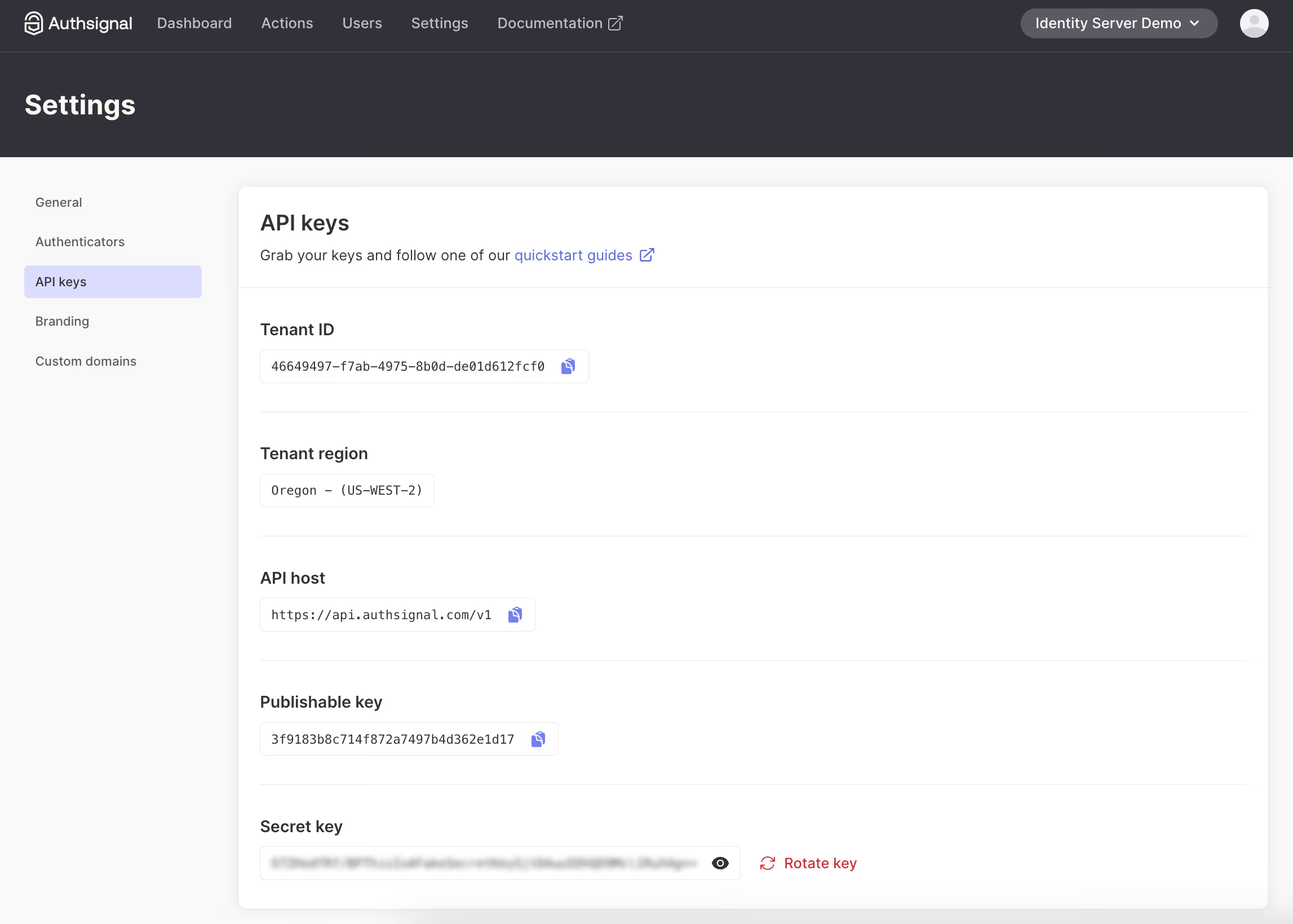
- Add these environment variables to both your frontend and Lambda functions. You’ll also need your User Pool ID, User Pool Client ID, and Region from your AWS Console.
- Add these credentials to your frontend
.envfile (for client-side SDK) - Create separate environment variables for your Lambda functions (for server-side validation)
- Add these credentials to your frontend
// From .env

VITE_USER_POOL_ID=
VITE_USER_POOL_CLIENT_ID=
VITE_AWS_REGION=
VITE_AUTHSIGNAL_TENANT_ID=
VITE_AUTHSIGNAL_URL=
AUTHSIGNAL_SECRET=
// From lambdas/.env

AUTHSIGNAL_SECRET=
AUTHSIGNAL_URL=
USER_POOL_ID=
USER_POOL_CLIENT_ID=
User Pool Settings on AWS Console
For this example, there are several important settings to configure when creating a Cognito User Pool
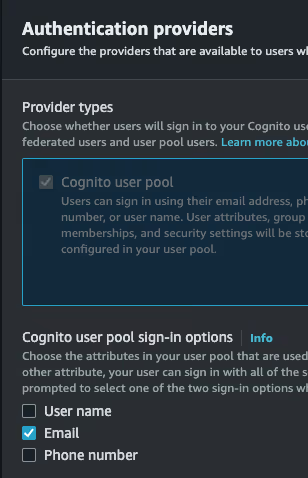
- Choose 'Email’ as the sign-in option.
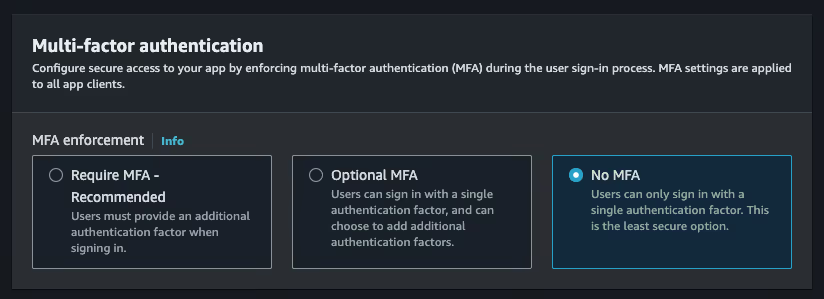
- Choose ’No MFA’ as the MFA option. This can be implemented with Authsignal instead.
- Enable ’self-registration’ so we can let users sign up directly from the SPA without going through a backend.

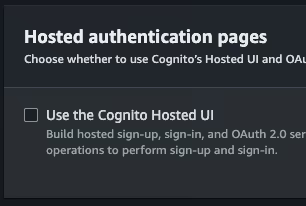
- Disable the ’Cognito Hosted UI’. The SPA replaces this.
- Select ’Public client’ for the app type. Also, select `Don’t generate a client secret’.

Setting Up AWS Cognito with Authsignal
Backend Components
The integration requires several Lambda functions that handle different parts of the authentication flow:
1. Create Auth Challenge (Lambda)
This Lambda function creates a challenge when a user attempts to sign in or completes a sign-up. It communicates with Authsignal to generate a token:
// From lambdas/create-auth-challenge/handler.ts

import {Authsignal} from "@authsignal/node";
import {CreateAuthChallengeTriggerHandler} from "aws-lambda";

const authsignal = new Authsignal({
  apiSecretKey: process.env.AUTHSIGNAL_SECRET!,
  apiUrl: process.env.AUTHSIGNAL_URL!,
});

export const handler: CreateAuthChallengeTriggerHandler = async (event) => {
  const userId = event.request.userAttributes.sub;
  const email = event.request.userAttributes.email;

  const {token} = await authsignal.track({
    userId,
    action: "cognitoAuth",
    attributes: {
      email,
    },
  });

  event.response.publicChallengeParameters = {token};

  return event;
};
This Lambda function uses Authsignal's track method to create a challenge token that's passed back to the client.
2. Verify Auth Challenge Response (Lambda)
This function verifies the challenge response received from the client:
// From lambdas/verify-auth-challenge-response/handler.ts

import {Authsignal} from "@authsignal/node";
import {VerifyAuthChallengeResponseTriggerHandler} from "aws-lambda";

const authsignal = new Authsignal({
  apiSecretKey: process.env.AUTHSIGNAL_SECRET!,
  apiUrl: process.env.AUTHSIGNAL_URL!,
});

export const handler: VerifyAuthChallengeResponseTriggerHandler = async (event) => {
  const userId = event.request.userAttributes.sub;
  const token = event.request.challengeAnswer;

  const {state} = await authsignal.validateChallenge({
    userId,
    action: "cognitoAuth",
    token,
  });

  event.response.answerCorrect = state === "CHALLENGE_SUCCEEDED";

  return event;
};
This function validates the token returned from the client-side Authsignal challenge to determine if the authentication challenge was successfully completed.
3. Additional Required Cognito Lambda FunctionsThe following Lambda functions don't integrate directly with Authsignal but are required for Cognito custom authentication flows:
Define Auth Challenge:
Used to define when a challenge has been completed successfully and tokens should be issued.
Pre-Sign-Up:
Used to auto-confirm users during sign-up, since we are verifying their email as part of the sign-up flow itself.
Frontend Implementation
Setting Up the AWS SDK
The frontend uses the AWS SDK to communicate with Cognito:
// From src/lib/aws-auth.ts

import {
  CognitoIdentityProviderClient,
  InitiateAuthCommand,
  SignUpCommand,
  ConfirmSignUpCommand,
  RespondToAuthChallengeCommand,
  // Other imports...
} from "@aws-sdk/client-cognito-identity-provider";

const client = new CognitoIdentityProviderClient({
  region: import.meta.env.VITE_AWS_REGION,
});
Authentication Flows
Sign-Up Flow
The sign-up process begins when a user enters their email:
// From src/routes/sign-up/sign-up.tsx

const onSubmit = form.handleSubmit(async ({email}) => {
  setIsLoading(true);

  try {
    // Create user in Cognito with a random password (not actually used)
    await signUp({
      username: email,
      password: Math.random().toString(36).slice(-16) + "X", // Dummy value
      userAttributes: {
        email,
      },
    });

    // Immediately sign in to trigger MFA
    const signInResult = await signIn({
      username: email,
    });

    if (signInResult.nextStep === "CUSTOM_CHALLENGE") {
      // Obtain the Authsignal token returned by the Create Auth Challenge lambda
      const token = signInResult.challengeParameters?.token;

      if (!token) {
        throw new Error("Token is required to initiate challenge.");
      }

      // Set the Authsignal token on the client SDK
      authsignal.setToken(token);

      // Initiate an email OTP challenge
      await authsignal.email.enroll({email});

      // Navigate to OTP verification page
      navigate("/confirm-sign-up", {
        state: {
          email,
          session: signInResult.session,
          token
        }
      });
    }
  } catch (ex) {
    // Error handling
  }

  setIsLoading(false);
});
Sign-In Flow
The sign-in process also begins with the user entering their email:
// From src/routes/login/login.tsx

const onSubmit = form.handleSubmit(async ({email}) => {
  setIsLoading(true);

  try {
    const signInResult = await signIn({
      username: email,
    });

    if (signInResult.nextStep === "CUSTOM_CHALLENGE") {
      // Obtain the Authsignal token returned by the Create Auth Challenge lambda
      const token = signInResult.challengeParameters?.token;

      if (token) {
        // Set the Authsignal token on the client SDK
        authsignal.setToken(token);

        // Initiate an email OTP challenge
        await authsignal.email.challenge();
      }

      navigate("/mfa", {
        state: {
          token,
          email,
          session: signInResult.session
        }
      });
    }
  } catch (ex) {
    // Error handling
  }

  setIsLoading(false);
});
MFA Verification Flow
Both sign-up and sign-in processes use Authsignal for verification. While they use different routes (/confirm-sign-up for new users and /mfa for existing users), the verification mechanism is essentially the same:
// Verification process (used in both confirm-sign-up and mfa components)

// 1. The token is already set and challenge already sent from the login/signup page
// The component just sets the token again for subsequent operations
useEffect(() => {
  authsignal.setToken(token);
}, [token]);

// 2. When the user submits the verification code
const verifyResponse = await authsignal.email.verify({code});

if (verifyResponse.data?.token) {
  // 3. Complete the Cognito challenge with the Authsignal token
  const challengeResult = await respondToChallenge(
    email,
    session,
    verifyResponse.data.token
  );

  if (challengeResult.nextStep === "SIGN_IN_COMPLETE" && challengeResult.tokens) {
    // 4. Set the tokens and navigate to the secured area
    setTokens(challengeResult.tokens);
    navigate("/account/security");
  }
}
Adding Different Authenticator Types
You can also add multiple types of authenticators. This example implementation includes four options:
1. Email OTP
Email-based one-time passwords are used for both sign-in and sign-up verification.
2. Passkeys
Integrate modern, passwordless authentication with passkeys for a seamless login experience.
// From login page

const handlePasskeySignIn = useCallback(
  async ({autofill = false}: {autofill: boolean}) => {
    try {
      const signInResponse = await authsignal.passkey.signIn({action: "cognitoAuth", autofill});

      if (signInResponse.data?.token && signInResponse.data?.username) {
        const signInResult = await signIn({
          username: signInResponse.data.username,
        });

        if (signInResult.nextStep === "CUSTOM_CHALLENGE") {
          const challengeResult = await respondToChallenge(
            signInResponse.data.username,
            signInResult.session!,
            signInResponse.data.token
          );

          if (challengeResult.nextStep === "SIGN_IN_COMPLETE" && challengeResult.tokens) {
            setTokens(challengeResult.tokens);
            navigate("/account/security");
          }
        }
      }
    } catch {
      // Handle errors
    }
  },
  [navigate, toast],
);
3. Email Magic Link
Implement passwordless magic link authentication:
// From src/routes/account/security/add-email-magic-link-dialog.tsx

const sendEmailMagicLink = async () => {
  const [{authsignalToken}, user] = await Promise.all([addAuthenticator(), getCurrentUser()]);

  authsignal.setToken(authsignalToken);

  const email = user.Username;

  if (!email) {
    signOut();
    return;
  }

  // Send the magic link email
  await authsignal.emailML.enroll({email});

  // Check if the user has clicked the link
  const verificationStatusResponse = await authsignal.emailML.checkVerificationStatus();

  if (verificationStatusResponse.data?.isVerified) {
    queryClient.invalidateQueries({queryKey: ["authenticators"]});
    setIsOpen(false);
  }
};
4. TOTP (Authenticator Apps)
Add support for time-based one-time passwords with popular authenticator apps:
const handleGenerateQRCode = async () => {
  const {authsignalToken} = await addAuthenticator();
  authsignal.setToken(authsignalToken);
  const totpEnrollResponse = await authsignal.totp.enroll();
  // Display QR code to user
};

const handleSubmit = form.handleSubmit(async ({code}) => {
  const verifyResponse = await authsignal.totp.verify({code});
  // Handle verification result
});
Conclusion
This implementation demonstrates how AWS SDK with Authsignal Web SDK gives you complete control over your authentication flows and UI design. By leveraging Lambda triggers and custom challenge flows, you can create a tailored authentication experience. This approach provides the flexibility to implement exactly what your application requires without compromising on user experience or security.
.svg)


