Platform
Platform
Drop-In Authentication
Passkeys
Phishing-resistant, FIDO2/WebAuthn
Biometric authentication
Face and device-native biometrics
WhatsApp OTP
Global reach, lower cost than SMS
Email OTP
Universal second factor
App push authentication
Native device push notifications
Palm biometrics
Contactless identity verification
All authentication methods
KEY FEATURES
No-code rules engine
Step-up auth, risk policies, alerts
User observability
Audit trails, dynamic linking
Risk-based authentication
Adaptive MFA by context
Session management
Persistent sessions across channels
Digital credentials API
Verify sovereign digital IDs
Pre-built UI
Fastest deployment path
Passkeys
Deploy phishing-resistant passkeys across web and mobile in days
Solutions
Solutions
USE CASE
Account Takeover Prevention
Stop ATO without adding friction
Go Passwordless
Replace passwords with passkeys
Account Recovery
Secure self-service recovery flows
Call Centre Authentication
Verify callers without KBA
SMS Cost Optimisation
Cut OTP costs up to 90%
Existing Apps (Drop-In)
Add auth without re-architecting
Palm biometric payments
Contactless in-store payments
INDUSTRY
Financial Services & Banking
Secure high-value transactions
Healthcare
Authentication for ePHI access
Loyalty Programs
Protect points and member accounts
ROLE
Engineering
Fast integration, flexible SDKs
Product
No-code flows, conversion insights
Cybersecurity
Risk policies, compliance, audit trails
PricingCustomers
Resources
Resources
LEARN
Blog
Guides
Regulatory
Templates
Docs
COMPANY
About Us
Why Authsignal
Partners
Careers
Security
Contact
INTEGRATIONS
Amazon Cognito
Auth0
Azure AD B2C
Custom identity provider
Duende IdentityServer
All integrations
Docs
Start a trial
Book a callLogin
AUS Flag

Authsignal secures millions of passkey transactions out of our hosted Sydney region.

AUS Flag

Authsignal secures millions of passkey transactions out of our hosted Sydney region.

Join us today!
Right icon
Blog
/
Current article
FIDO2
Flexible multi-factor authentication
No-code rules engine
Multi-factor authentication
Passkeys
Auth0 integration

Enable MFA for Auth0 with Authsignal in 5 Easy Steps - Authsignal

Justin Soong
⬤
May 13, 2025
Share
Adaptive MFA and or Passkeys for Auth0 with Authsignal

How to enable MFA for Auth0 using Authsignal

Auth0 is a great platform for adding core identity functionality to your app, especially for requirements like federation (Single Sign On or “SSO”), token management, or using their Universal Login page.

But there are a few reasons why you might want to turbo-charge Auth0’s base functionality with additional tools like Authsignal, especially when it comes to MFA and step-up authentication.

Here are a few reasons:

  • You want to enable more Passwordless MFA factors without upgrading your Auth0 plan.
  • You want flexibility on how and when to enrol a user for MFA.
  • You want to control exactly when and where users must complete step-up MFA challenges in your app with conditional logic. This logic might need to depend on the action or transaction which the user is performing and not on their authenticated session (the technical term for this is “transaction signing”).
  • You want to add step-up authentication flows anywhere in your app without having to build your own UI (similar to Auth0’s Universal Login Page — but for MFA). This could include other user-facing touch points like customer support chatbots.
  • You want to keep an audit trail of reasons why a user has been prompted to complete an MFA challenge.
  • Your app is in a highly security-focused vertical — like Crypto On-Ramps, FinTech and Marketplaces — which typically have more nuanced MFA requirements.

Authsignal’s suite of tools provides solutions to all of the above, giving your app more flexibility and visibility without the need to migrate away from Auth0.

The key features of Authsignal for Auth0 are:

  • A suite of Passwordless Authentication factors that can work directly with Auth0: SMS, authenticator apps (TOTP), FIDO2/WebAuthn, and email magic links.
  • A no-code fraud rules engine that you can manage completely without the need for engineers.
  • A full audit trail and a single view of your customer, which includes sign-in activity as well as key points specific to your customer journey (like a withdrawal flow in a FinTech app).
  • A suite of SDK helpers that work out-of-the-box with Auth0 Actions.

This blog post will demonstrate how to add MFA to your app by integrating Auth0 with Authsignal in five quick steps.

Step 1 — Create an Auth0 Action

In the Auth0 Dashboard, go to Actions → Library and select “Build Custom”. Then select the “Login / Post Login” trigger and give the action an appropriate name (for example “post-login-mfa”).
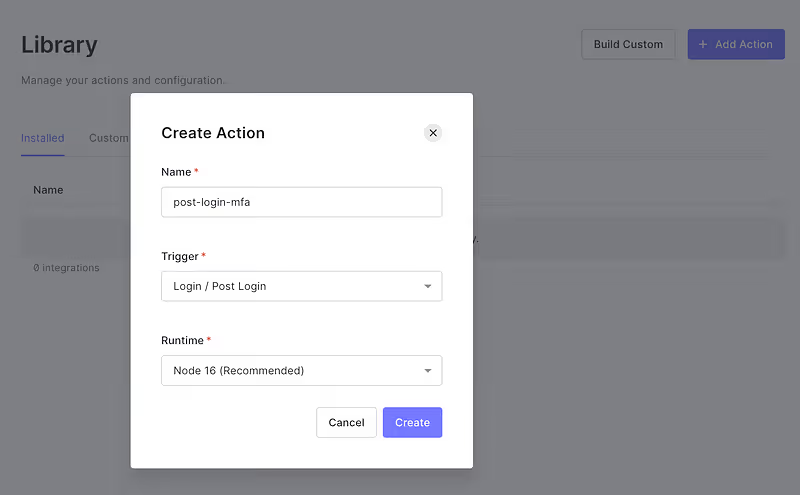
Create an Auth0 Action

Step 2 — Add your Authsignal Secret Key

Now your action has been created, create a new secret called AUTHSIGNAL_SECRET and provide the value of your secret from the API Keys section in the Authsignal Portal.
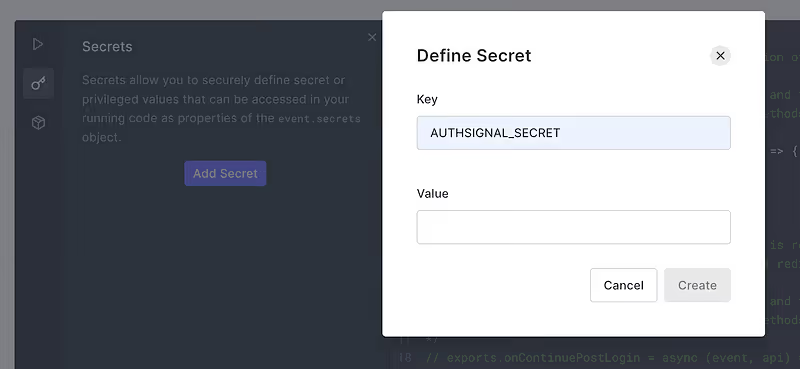
Defined the Authsignal Secret Key

Step 3 — Add Dependencies

Add the @authsignal/node dependency.
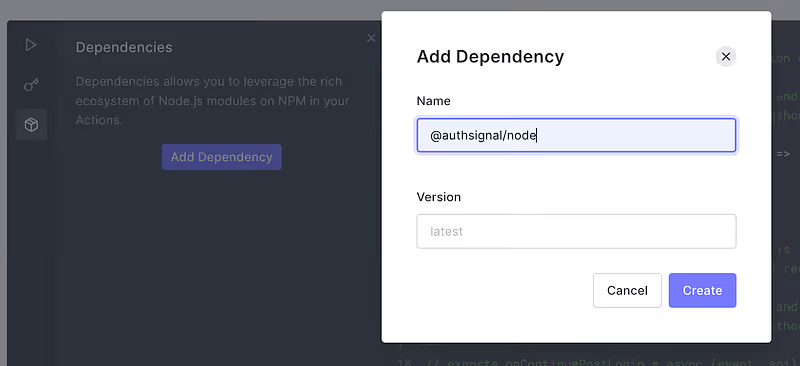
Add the Authsignal NodeJS npm package

Step 4 — Add the Authsignal for Auth0 action code

Add the following code snippet to the action.

const { handleAuth0ExecutePostLogin, handleAuth0ContinuePostLogin } = require("@authsignal/node");

exports.onExecutePostLogin = handleAuth0ExecutePostLogin;

exports.onContinuePostLogin = handleAuth0ContinuePostLogin;

Step 5 — Add the Authsignal for Auth0 action code

Now connect your action in the Flows section of the Auth0 Dashboard by dragging it into the Login flow.
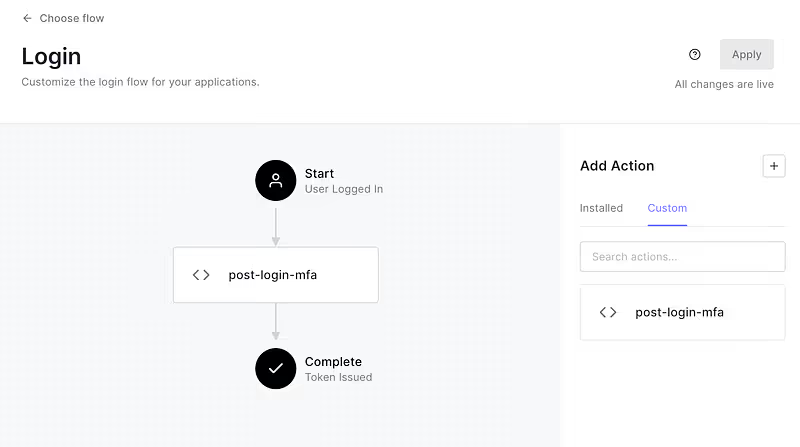
And that’s it, the above 5 steps are all that you have to configure within your Auth0 tenant, and everything else is handled seamlessly by Authsignal. It’s that simple.

Now, you can set up MFA for Auth0 with Authsignal. You can learn how to fine-tune your user experience with adaptive MFA with just a few adjustments to your integration code. 

To view the comprehensive documentation, check out our Developer Docs, sign up to Authsignal and start enabling MFA for Auth0.

Question icon
Have a question?
Talk to an expert
NewsletterDemo PasskeysView docs
FIDO2
Flexible multi-factor authentication
No-code rules engine
Multi-factor authentication
Passkeys
Auth0 integration

You might also like

The passkey UX patterns that drive adoption in 2026
Passkeys
Passkeys implementation

The passkey UX patterns that drive adoption in 2026

July 2, 2026
What is silent network authentication, and how does it work?
Silent Network Authentication
SNA

What is silent network authentication, and how does it work?

June 26, 2026
HIPAA MFA requirements and what to do before the final rule lands
Passkeys
Step up authentication
Adaptive MFA
SMS Alternative

HIPAA MFA requirements and what to do before the final rule lands

July 4, 2026

Secure your customers’ accounts today with Authsignal

Passkey demoCreate free account
Authsignal Purple Logo

Authsignal is a drop-in authentication and orchestration layer for consumer-facing businesses. Passkeys, adaptive MFA, and omnichannel verification on top of your existing identity stack. Deployed in weeks, not quarters.

AICPA SOCFido Certified
LinkedInTwitter
Platform
Drop-In Authentication
PasskeysBiometric authenticationWhatsApp OTPEmail OTPApp push authenticationPalm biometricsSMS OTPEmail OTPMagic LinksAuthenticator apps (TOTP)
View all auth methods
KEY FEATURES
No-code rules engineUser observabilityRisk-based authenticationSession managementDigital credentials APIPre-built UI
All authentication methods
Pricing
Customers
Solutions
USE CASE
Account takeovers (ATO)
Go passwordless
Call center
SMS cost optimization
Existing apps
Palm biometric payments
View all use cases
industry
Financial services
Healthcare
Marketplace
View all use cases
ROLE
Engineering
ProductCybersecurityDocs
Compare
Twilio Verify vs AuthsignalAuth0 vs AuthsignalAWS Cognito vs Authsignal + AWS Cognito
Resources
LEARN
BlogGuidesRegulatoryTemplatesDocs
COMPANY
About usWhy AuthsignalPartnersCareersSecurityContact
Integrations
Amazon Cognito
Azure AD B2C
Duende IdentityServer
Keycloak
Auth0
NextAuth.js
Custom identity provider
All integrations
United States
+1 214 974-4877
Ireland
+353 12 676529
Australia
+61 387 715 810
New Zealand
+64 275 491 983
© 2026 Authsignal - All Rights Reserved
Terms of servicePrivacy policySecuritySystem statusCookies